
Learn what M3U IPTV is, how it works, legal risks, top players, pricing & alternatives. A complete 2026 guide for learners, freelancers & startups.
Introduction
If you’ve spent any time researching streaming technology, you’ve almost certainly come across the term M3U IPTV. It shows up in forum threads, YouTube tutorials, and countless “best IPTV” roundups — yet most explanations either oversimplify it into “free TV” or bury it in technical jargon that means little to a non-developer.
This guide takes a different approach. Whether you’re a learner trying to understand how internet television actually works, a freelancer building a media project for a client, or a startup/small business owner exploring streaming technology for internal use, corporate training, or a legitimate content product, you’ll find a clear, accurate, and practical breakdown here.
🚀 Get Started with M3U IPTV
We’ll cover what M3U IPTV actually is, how the technology works under the hood, which tools and players are worth using, what the pricing landscape looks like, and — critically — the legal considerations that most articles conveniently skip. By the end, you’ll be able to make an informed decision instead of relying on marketing hype.
What Is M3U IPTV?
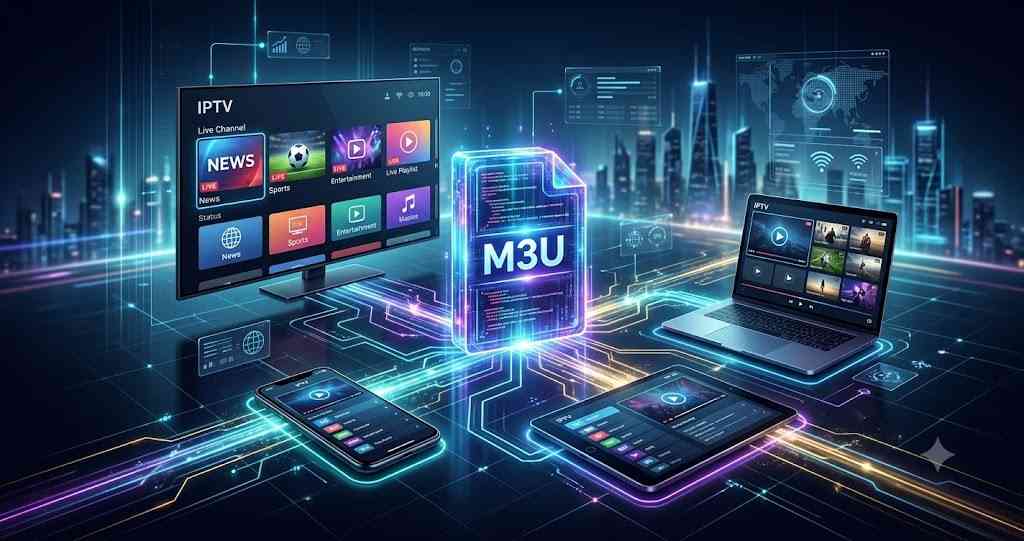
M3U IPTV refers to the combination of two things:
- M3U (or M3U8) — a lightweight playlist file format that lists the URLs (web addresses) of media streams.
- IPTV (Internet Protocol Television) — the delivery of television content over the internet instead of traditional satellite, cable, or terrestrial broadcast signals.
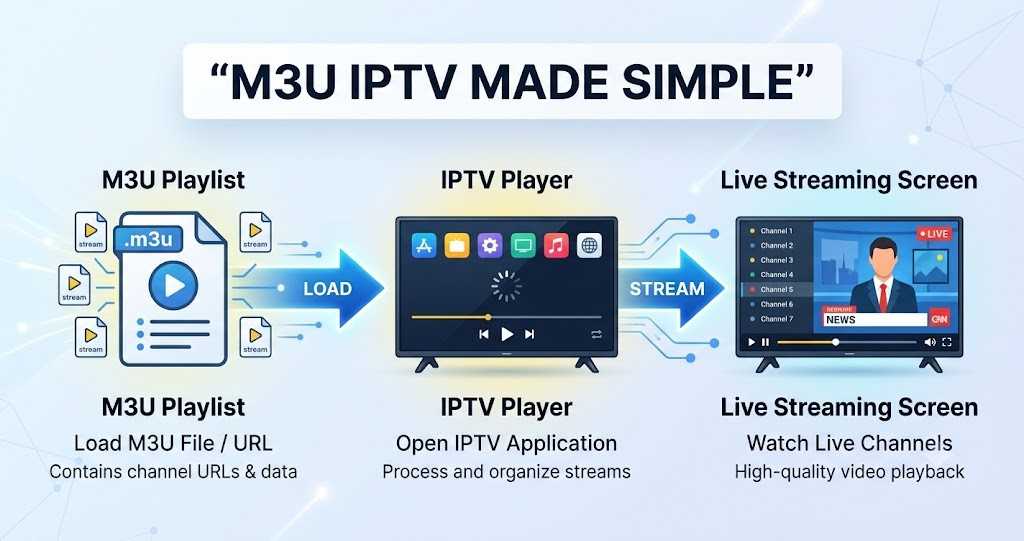
Put simply, an M3U file is like a table of contents for video channels. It doesn’t contain any video itself — it’s a plain text file that tells a media player where to find each stream, along with a name and, often, a logo.
What Does “M3U” Actually Mean?
M3U stands for MP3 URL, a naming convention that dates back to the early days of digital audio playlists in the 1990s. Over time, the format was adapted to reference video streams as well, which is how it became the backbone of modern IPTV playlists.
How an M3U Playlist Works
A typical M3U file looks something like this:
#EXTM3U
#EXTINF:-1 tvg-id="ChannelOne" tvg-logo="logo.png" group-title="News",Channel One
https://tereatv.com/billing/aff.php?aff=106
#EXTINF:-1 tvg-id="ChannelTwo" group-title="Sports",Channel Two
https://github.com/Best-IPTV-for-USA
Each #EXTINF line contains metadata (channel name, logo, category), and the line below it is the actual stream URL. When you load this file into an IPTV player app, the app reads the list and displays it as a browsable channel guide.
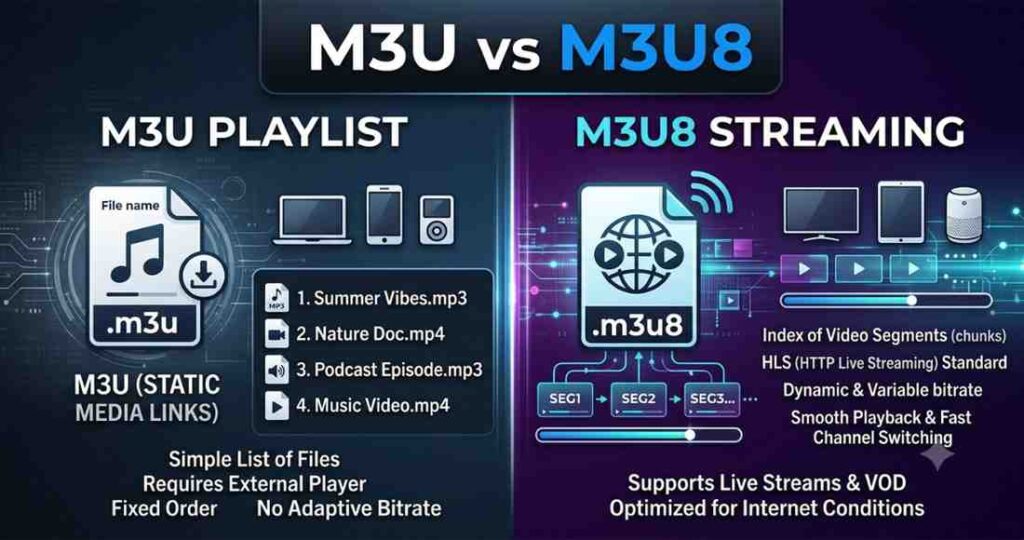
M3U vs. M3U8: What’s the Difference?
- M3U — the original plain-text playlist format.
- M3U8 — the same format encoded in UTF-8, which supports HLS (HTTP Live Streaming), the protocol most modern streaming platforms rely on.
In practice, the terms are used interchangeably today, since almost all contemporary IPTV playlists are UTF-8 encoded.
Is M3U IPTV Legal?
This is the single most important question anyone researching this topic should ask — and it deserves a direct answer.
- The M3U format itself is completely legal. It’s an open, generic playlist standard used by countless legitimate applications — corporate video libraries, security camera systems, radio stations, self-hosted media servers, and licensed streaming platforms.
- What determines legality is the content behind the playlist. If the streams point to channels or content that the provider does not have distribution rights for, accessing or reselling that playlist is copyright infringement in most countries, and in some jurisdictions can carry civil or criminal penalties for the operator.
- A large share of “cheap IPTV subscription” services advertised online redistribute copyrighted broadcast channels without a license. Using or promoting these services carries real legal and security risk (unstable service, malware-laden apps, payment fraud, and potential legal exposure).
This guide focuses exclusively on the technology, legitimate players, and properly licensed use cases — not on unauthorized subscription resellers. If you want IPTV-style access to premium channels, use officially licensed streaming services (many of which now support M3U/HLS delivery behind the scenes).
Why M3U IPTV Matters in 2026
Streaming has fully overtaken traditional broadcast in most markets, and the infrastructure behind it has matured considerably. A few trends explain why M3U-based IPTV technology is more relevant than ever:
- Cord-cutting is now the norm, not the exception, pushing broadcasters, telecoms, and businesses to deliver content over IP rather than legacy signals.
- Smart TVs, streaming boxes, and mobile devices ship with native or easily installable support for M3U/HLS playback.
- Businesses increasingly self-host internal video content (training libraries, product demos, live company broadcasts) using the same open standards that power IPTV, because it’s cheaper and more flexible than proprietary platforms.
- Freelancers and developers building media, hospitality (hotel TV systems), or digital signage projects frequently need to understand M3U/HLS to deliver client work.
- Licensed streaming providers are adopting HLS/M3U8 as a standard delivery format because it’s efficient, adaptive (adjusts video quality to bandwidth), and works across nearly every device.
Understanding this technology is no longer a niche technical skill — it’s foundational knowledge for anyone working in media, e-commerce, hospitality, education, or digital product development.
🚀 Get Started with M3U IPTV
Key Benefits of Understanding M3U-Based IPTV Technology
- Device flexibility — one playlist format works across smart TVs, phones, tablets, browsers, and streaming boxes.
- Low technical overhead — M3U is plain text; it’s easy to generate, parse, and troubleshoot.
- Adaptive streaming support — when paired with HLS, playback quality automatically adjusts to the viewer’s connection.
- Cost-effective for legitimate self-hosting — businesses can build internal or licensed video distribution without expensive proprietary broadcast infrastructure.
- Wide open-source ecosystem — free, well-maintained player apps exist for nearly every platform.
- Scalable for small teams — a freelancer or a two-person startup can prototype a working streaming product quickly using open standards.
Top M3U IPTV Tools & Legitimate Services
Rather than listing unlicensed subscription resellers (a legal and security minefield), this section focuses on the software and legitimate platforms that are genuinely useful and safe to use.
Best M3U IPTV Player Apps
These are legal, widely used applications that play M3U/M3U8 playlists — they don’t provide content themselves, which is what makes them safe to install regardless of platform.
- VLC Media Player — free, open-source, cross-platform; supports direct M3U playlist loading.
- TiviMate — a polished Android/Android TV IPTV player with EPG (electronic program guide) support; popular for self-hosted or licensed playlists.
- IPTV Smarters Pro — one of the most widely used IPTV player apps, available on Android, iOS, Windows, and Amazon Fire TV.
- Perfect Player IPTV — lightweight player with strong EPG and multi-playlist support.
- GSE Smart IPTV — flexible player with support for multiple playlist formats and parental controls.
- Kodi (with legal add-ons) — a powerful open-source media center that can organize and play M3U sources alongside personal or licensed media libraries.
Legitimate Platforms Using M3U/HLS Delivery
- Enterprise video platforms (e.g., corporate LMS and internal broadcast tools) frequently generate M3U/HLS streams for training content.
- Licensed live-TV streaming services (region-dependent, such as major telecom-operated streaming bundles) use HLS/M3U8 under the hood even though users never see the raw playlist.
- Self-hosted media servers (e.g., Jellyfin, Plex with live TV modules) let individuals and small businesses build fully legal personal or internal IPTV setups using content they own or have rights to.
Comparison Table: Popular M3U/IPTV Player Apps
| Player App | Platforms | EPG Support | Multi-Playlist | Best For | Free Version |
|---|---|---|---|---|---|
| VLC | Windows, Mac, Linux, Android, iOS | Basic | Yes | Beginners & quick testing | Yes (fully free) |
| TiviMate | Android, Android TV, Fire TV | Advanced | Yes | Home theater setups | Limited free tier |
| IPTV Smarters Pro | Android, iOS, Windows, Fire TV | Advanced | Yes | Cross-device households | Yes |
| Perfect Player | Android, Android TV | Advanced | Yes | Power users wanting customization | Yes |
| GSE Smart IPTV | Android, iOS, Windows, Apple TV | Moderate | Yes | Parental-controlled setups | Yes |
| Kodi | Windows, Mac, Linux, Android | Via add-ons | Yes | Full media center builds | Yes (fully free) |
🚀 Get Started with M3U IPTV
Features to Look for in an M3U IPTV Player
- EPG (Electronic Program Guide) support — shows what’s currently playing and what’s coming up.
- Multi-playlist / multi-source management — useful if you manage more than one legitimate content feed.
- Catch-up / timeshift support — lets viewers rewind live content (only meaningful with licensed sources that support it).
- Parental controls — important for family or business environments.
- Cross-device sync — favorites and settings carried across devices.
- Adaptive bitrate playback — smooth streaming across varying connection speeds.
- Custom EPG import (XMLTV) — lets you attach a program guide to your own playlist.
- Chromecast / AirPlay support — for casting to a TV from mobile.
Pricing Table: M3U IPTV Player Apps (2026)
| App | Free Tier | Paid Tier | Typical Paid Price |
|---|---|---|---|
| VLC | Full app, no restrictions | N/A | Free forever |
| TiviMate | Basic features, limited playlists | Premium unlocks EPG & multi-playlist | ~$5–$25 (one-time or annual) |
| IPTV Smarters Pro | Core playback features | Smarters Pro+ for cloud sync/extra features | ~$10–$20/year |
| Perfect Player | Full playback, ad-supported | Ad-free / Pro unlock | ~$5 one-time |
| GSE Smart IPTV | Full playback, limited customization | Pro version | ~$5–$10 one-time |
| Kodi | Fully free and open-source | N/A | Free forever |
Note: Pricing reflects the player software only. Legitimate live-TV or on-demand content subscriptions (licensed broadcasters, telecom bundles, streaming services) are billed separately by the content provider and vary widely by country and package.
Use Cases for M3U IPTV Technology
- Personal media organization — combining your own recorded or licensed content into a single browsable playlist.
- Corporate training libraries — HR and L&D teams distributing internal video content across office devices.
- Hospitality industry — hotels building in-room TV systems using licensed channel feeds.
- Digital signage — retail businesses running looped promotional video content via M3U playlists.
- Freelance media projects — developers building custom streaming front-ends for clients using legally sourced feeds.
- Educational institutions — distributing lecture recordings or licensed educational broadcasts across a campus network.
- Home media centers — combining a household’s own DVR recordings, licensed streaming add-ons, and personal video libraries.
Best For
| User Type | Why M3U IPTV Knowledge Helps |
|---|---|
| Learners / students | Understanding core internet-streaming concepts (HLS, adaptive bitrate, playlist parsing) that underpin much of modern media tech. |
| Freelancers / developers | Building client projects — digital signage, custom players, hospitality systems — that rely on M3U/HLS delivery. |
| Startups & small businesses | Setting up cost-effective internal video distribution (training, product demos, live company updates) without expensive proprietary platforms. |
| Hobbyists | Organizing personal and legally owned media into a clean, unified viewing experience. |
🚀 Get Started with M3U IPTV
Pros and Cons of M3U-Based IPTV Technology
Pros
- Open, universal format supported by nearly every device and player.
- Lightweight and easy to generate or edit (plain text).
- Works seamlessly with adaptive streaming (HLS) for smooth playback.
- Huge ecosystem of free, well-maintained player apps.
- Flexible enough for personal, educational, and enterprise use cases.
Cons
- The playlist format itself carries no built-in rights management — legality depends entirely on where the streams originate.
- The market is flooded with unlicensed “IPTV subscription” sellers, making it easy for beginners to unknowingly use infringing services.
- Stream reliability varies widely depending on the source server’s quality and bandwidth.
- Some player apps require manual EPG/XMLTV configuration, which can be confusing for non-technical users.
- No standardized customer support layer — unlike a licensed streaming platform, self-managed M3U setups mean you are responsible for troubleshooting.
Best Alternatives to Unlicensed IPTV Subscriptions
If your goal is simply to watch live TV and on-demand content legally, these are safer, fully licensed alternatives:
- Official broadcaster streaming apps — most national and regional broadcasters now offer their own licensed live and on-demand apps.
- Telecom-operated streaming bundles — many internet and mobile carriers offer bundled live-TV streaming packages in their home markets.
- Subscription video-on-demand platforms — major global platforms offering licensed movies, series, and increasingly live channels.
- Free ad-supported streaming (FAST) channels — a growing category of legally licensed, ad-supported live channels available through smart TV apps.
- Self-hosted personal media servers (Jellyfin, Plex) — ideal for organizing content you personally own or have the rights to stream.
Future Trends in M3U & IPTV Technology (2026 and Beyond)
- AI-powered EPG and content discovery — smarter program guides that learn viewing habits and surface relevant licensed content.
- Tighter anti-piracy enforcement — regulators and ISPs in multiple countries are increasing action against unlicensed IPTV resellers, making legitimate sources more important than ever.
- Convergence of FAST channels and traditional IPTV — the line between “free ad-supported streaming” and classic IPTV delivery is blurring, with more legal free options emerging.
- Improved low-latency HLS — reducing the delay between live broadcast and viewer playback, closing the gap with traditional cable.
- Greater device-level standardization — smart TV manufacturers building more native, secure playlist and streaming support directly into firmware.
- Rise of business-focused self-hosted streaming — more startups and SMBs adopting open-source streaming stacks for internal use rather than expensive enterprise video platforms.
Conclusion
M3U IPTV is, at its core, a simple and powerful idea: a plain-text playlist format that points media players to video streams, built on the same open standards (HLS/M3U8) that power much of modern streaming. For learners, it’s a great entry point into understanding how internet television actually works. For freelancers and developers, it’s a practical skill for building media, hospitality, and signage projects. For startups and small businesses, it offers a low-cost way to distribute training and internal content.
The technology itself is completely legitimate — but how it’s used matters. Stick to licensed content sources and reputable, well-reviewed player apps, and you’ll get a flexible, reliable streaming setup without the legal and security risks that come with unauthorized IPTV subscription services.
FAQ’s
1. What does M3U stand for in IPTV?
M3U originally stood for “MP3 URL,” a playlist format from the 1990s that was later adapted to reference video streams, forming the basis of most modern IPTV playlists.
2.Is M3U IPTV legal to use?
The M3U playlist format itself is completely legal — it’s an open standard. Legality depends entirely on whether the streams listed in the playlist come from properly licensed content sources.
3. What’s the difference between M3U and M3U8?
M3U8 is the UTF-8 encoded version of the M3U format, designed to support HLS streaming. Today the terms are used almost interchangeably.
4. Do I need special hardware to use an M3U IPTV player?
No. Most M3U/IPTV player apps run on everyday devices — smartphones, smart TVs, streaming boxes, and computers.
5.What’s the safest way to access live TV through IPTV-style technology?
Use officially licensed broadcaster apps, telecom-operated streaming bundles, or legitimate subscription platforms rather than unauthorized third-party “IPTV subscription” sellers.
6. Can a small business use M3U technology for internal purposes?
Yes. Businesses commonly use M3U/HLS-based self-hosted systems for training libraries, internal broadcasts, and digital signage using content they own or have licensed.
7. Are free M3U IPTV player apps safe?
Reputable, well-known apps like VLC, Kodi, TiviMate, and IPTV Smarters Pro are safe to install — they are simply players. Safety concerns usually come from the content sources (playlists) loaded into them, not the player software itself.