
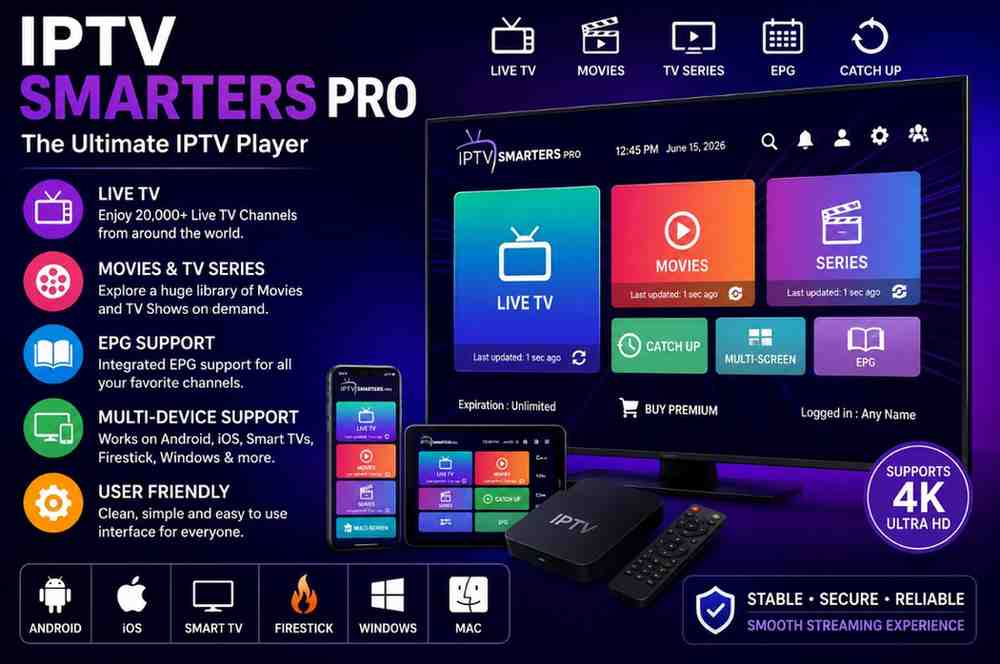
Website: Mediumtoday
Reading Time: 18–20 Minutes
Introduction
IPTV Smarters Pro is a widely used IPTV player application designed to help users organize and watch content from compatible IPTV services. Unlike traditional television platforms, IPTV players do not usually provide channels or streaming content themselves. Instead, they work as a software interface that connects with a user’s authorized IPTV service, playlist, or account details.
Many people search for IPTV Smarters Pro because they want to understand how the application works, which devices support it, what features it offers, and how to configure it correctly. However, there is often confusion between an IPTV player and an IPTV provider.
This guide explains everything users should know about IPTV Smarters Pro, including its main features, supported platforms, setup process, common issues, advantages, limitations, and important considerations before using the application.
Understanding IPTV Smarters Pro and Its Purpose
What Is IPTV Smarters Pro?
IPTV Smarters Pro is a media player application that allows users to access compatible IPTV content through supported login methods and playlists.
The application is designed to make IPTV viewing more organized by providing features such as:
- Content categories
- Playlist management
- Electronic Program Guide (EPG) support
- Video playback controls
- Multi-device compatibility
The app itself functions similarly to other media players. It provides the interface and playback tools, while the actual channels, movies, or programs come from the connected IPTV service.
Understanding this difference is important because installing IPTV Smarters Pro alone does not automatically provide access to television channels or premium content.
IPTV Player vs IPTV Service Provider
A common misunderstanding is assuming that IPTV Smarters Pro is an IPTV subscription service. These are separate.
| Category | IPTV Smarters Pro | IPTV Service Provider |
|---|---|---|
| Main purpose | Media playback application | Provides streaming content |
| Provides channels | No | Depends on provider |
| Requires login details | Usually yes | Provides account details |
| Controls content | No | Yes |
| Manages playlists | Yes | Creates playlist access |
| Handles playback | Yes | Usually no |
The player and the service work together, but they perform different functions.
For example, a user may install IPTV Smarters Pro and then connect it with a compatible service using available account information. The application displays and manages the content provided through that service.
Key Features of IPTV Smarters Pro
The popularity of IPTV Smarters Pro comes from its simple interface and range of features designed for IPTV users.
Organized Content Management
One of the main advantages of an IPTV player is helping users manage large content libraries.
Instead of manually opening playlist files or searching through long lists, users can often organize available content into categories.
Examples include:
- Live channels
- Movies
- Series
- Favorites
- Recently viewed content
The exact options available may depend on the app version and connected service.
Support for IPTV Login Methods
IPTV Smarters Pro may support common connection methods used by IPTV services.
These can include:
M3U Playlist
An M3U playlist is a file format commonly used to organize streaming links and channel information.
Users may receive an M3U URL from a compatible service and add it to a supported player.
Xtream Codes API
Xtream Codes API is another popular login method that allows users to connect through account credentials and server information.
This method can make setup easier because users may only need:
- Username
- Password
- Server address
Availability depends on the IPTV service and application version.
Electronic Program Guide (EPG) Support
An Electronic Program Guide provides information about scheduled programs.
With compatible services, EPG information may display details such as:
- Program names
- Broadcast times
- Channel schedules
- Current and upcoming programs
The accuracy of EPG information depends on the source providing the data.
If a guide is missing or incorrect, the issue may not be related to the IPTV player itself.
Multiple Device Support
One reason users choose IPTV Smarters Pro is its availability across different device categories.
Depending on current app availability, users may find versions for platforms such as:
- Android devices
- Smart TVs
- iOS devices
- Streaming devices
- Other supported platforms
Compatibility can change over time, so checking current availability for a specific device is recommended.
IPTV Smarters Pro Supported Devices
The experience of using IPTV Smarters Pro can vary depending on the device.
Android Smartphones and Tablets
Android devices are commonly used with IPTV applications because they offer flexibility and many customization options.
On Android devices, users may benefit from:
- Portable viewing
- Touch controls
- Easy account management
- Flexible app installation options
Performance depends on:
- Device hardware
- Internet connection
- Application version
Smart TVs
Many users prefer watching IPTV content on larger screens.
Smart TV compatibility depends on factors such as:
- TV operating system
- Available application stores
- Regional availability
- Developer support
Before installation, users should confirm that their specific TV model supports the required application version.
Android TV Devices
Android TV platforms are designed for television-based applications and remote control navigation.
A compatible IPTV player can provide a more traditional television-style experience with:
- Large screen viewing
- Remote navigation
- Category browsing
- Playback controls
iPhone and iPad Devices
Mobile Apple devices may support IPTV player applications depending on current availability and platform rules.
Users should always check official application sources for the latest compatibility information.
How IPTV Smarters Pro Works
The basic operation of IPTV Smarters Pro involves three main components:
1. Application Installation
The first step is installing the IPTV player on a compatible device.
Users should use trusted sources and avoid unknown modified application files because unofficial downloads may create security risks.
2. Connecting an Authorized IPTV Service
After installation, users generally need connection details from a compatible IPTV provider or personal playlist source.
Common information may include:
- Username
- Password
- Server URL
- Playlist address
Users should only connect services they are authorized to access.
3. Managing and Watching Content
Once connected, the application may organize available content into sections.
Depending on available features, users may be able to:
- Browse categories
- Create favorites
- View program information
- Adjust playback settings
- Manage playlists
The final viewing experience depends on both the application and the connected service.
IPTV Smarters Pro Setup Guide
Basic Setup Process
Setting up IPTV Smarters Pro is generally straightforward, but the exact steps may differ depending on the device and application version.
Step 1: Install the Application
Download and install the appropriate IPTV Smarters Pro version for your device.
Always verify that the source is reliable before installing any application.
Step 2: Select Login Method
Many IPTV players offer different connection options.
Common choices may include:
- Xtream Codes API
- M3U playlist
- Other supported methods
The available options depend on the version being used.
Step 3: Enter Account Information
Users may need to enter details supplied by their IPTV service.
This information may include:
- Account username
- Password
- Server information
Make sure the information is entered correctly to avoid connection problems.
Step 4: Load Content
After successful connection, the application may begin loading available categories and content information.
The loading time depends on:
- Internet speed
- Playlist size
- Server performance
Advanced Features of IPTV Smarters Pro
Beyond basic playback, IPTV Smarters Pro includes several features that can improve the overall viewing experience when used with compatible services.
Content Categories and Navigation
Large IPTV playlists can contain thousands of channels and programs. Without proper organization, finding specific content can become difficult.
IPTV Smarters Pro helps improve navigation by allowing users to browse content through structured categories.
Common categories may include:
- Live TV
- Movies
- TV series
- Favorites
- Recently watched content
The availability of these categories depends on the playlist or IPTV service connected to the application.
Favorites Management
A large channel list can make everyday browsing inconvenient. A favorites feature helps users create a personalized list of frequently watched content.
This can save time by reducing the need to search through complete playlists repeatedly.
Examples of useful favorites:
- Frequently watched channels
- Preferred entertainment categories
- Regular programs
Parental Control Options
Some IPTV applications include parental control features that allow users to restrict access to certain categories.
These features can be useful for households where multiple people use the same device.
Possible controls may include:
- Password protection
- Category restrictions
- Content filtering
Feature availability depends on the application version.
Multi-Screen Viewing Features
Some versions of IPTV applications support multi-screen or multi-user features.
These options can allow users to manage different viewing preferences from the same device.
However, available features can vary depending on:
- Device type
- Application version
- Subscription service configuration
Users should verify current capabilities before relying on specific features.
Improving IPTV Smarters Pro Performance
A smooth streaming experience depends on several factors, including internet quality, device performance, and service reliability.
Use a Stable Internet Connection
Streaming quality is strongly affected by network stability.
Common recommendations include:
- Use a reliable internet connection
- Avoid heavy downloads during streaming
- Use a wired connection when possible for compatible devices
- Place Wi-Fi routers in suitable locations
A fast connection alone does not guarantee smooth playback if the network is unstable.
Keep the Application Updated
Software updates may improve:
- Compatibility
- Security
- Performance
- Bug fixes
- Device support
Using outdated versions may lead to unnecessary problems, especially when operating systems or devices receive updates.
Check Device Storage and Performance
Older devices may experience playback problems because of limited hardware resources.
Possible factors include:
- Low storage space
- Limited processing power
- Background applications
- Outdated operating systems
Regularly maintaining your device can improve overall performance.
Common IPTV Smarters Pro Problems and Solutions
Even when properly configured, users may experience technical issues. Many problems are related to network conditions, account details, or service availability.
IPTV Smarters Pro Not Loading Channels
If channels fail to appear, possible causes include:
- Incorrect login information
- Expired service access
- Server problems
- Incorrect playlist details
- Internet connection issues
Possible solutions:
- Check account details
- Refresh the playlist
- Restart the application
- Confirm that the connected service is active
Buffering During Playback
Buffering is one of the most common streaming problems.
Possible causes include:
- Slow internet connection
- Network congestion
- Device limitations
- High server demand
- Poor-quality source streams
Possible solutions:
- Restart your router
- Test internet stability
- Reduce network usage
- Update the application
- Check whether the issue occurs on other devices
IPTV Smarters Pro Login Error
Login problems usually happen because of incorrect information.
Check:
- Username spelling
- Password accuracy
- Server URL
- Account status
If all details are correct, the issue may be related to the connected IPTV service.
EPG Information Missing
Electronic Program Guide information depends on the data provided by the connected service.
If EPG information is missing:
- Refresh the guide
- Check playlist settings
- Confirm that the service supports EPG data
The application cannot create missing program information by itself.
IPTV Smarters Pro Pros and Cons
Advantages
Easy Content Organization
The application helps users manage IPTV playlists more conveniently compared with manually opening playlist files.
Wide Device Availability
Depending on current support, users may access versions designed for different device categories.
User-Friendly Interface
The interface is designed to simplify browsing and playback management.
Supports Common IPTV Formats
Compatibility with common playlist and login methods makes setup easier for many users.
Limitations
Does Not Provide Streaming Content
IPTV Smarters Pro is a player application, not a television provider.
Users need a compatible service or authorized playlist source.
Features May Differ Between Versions
Different platforms may have different functions and availability.
Performance Depends on External Factors
Streaming quality depends on:
- Internet connection
- Device capability
- Service reliability
IPTV Smarters Pro vs Other IPTV Players
Several IPTV player applications are available, and users may compare them based on interface, compatibility, and available features.
| Feature | IPTV Smarters Pro | Other IPTV Players |
|---|---|---|
| Playlist support | Commonly available | Depends on application |
| User interface | Designed for IPTV navigation | Varies |
| Device support | Depends on version | Varies |
| EPG support | Available with compatible data | Depends on player |
| Content included | No | Usually no |
The best choice depends on the user’s device, preferred features, and compatibility requirements.
Security and Privacy Considerations
When using any streaming application, users should consider basic security practices.
Download Applications From Trusted Sources
Installing modified or unofficial application files can create risks such as:
- Malware exposure
- Privacy concerns
- Unauthorized access
Use reliable sources whenever possible.
Protect Account Information
If a service requires login credentials:
- Avoid sharing account details
- Use secure passwords
- Be cautious with unknown websites requesting information
Understand Service Legality
IPTV technology itself is a method of delivering television content over internet connections.
However, the legality of a specific service depends on whether it has proper rights and permissions for the content it distributes.
Users should verify that any service they use is legitimate and authorized.
Expert Tips for IPTV Smarters Pro Users
Verify Compatibility Before Installation
Before installing IPTV Smarters Pro, check:
- Device operating system
- Available storage
- Application availability
- Required login method
This prevents unnecessary setup issues.
Understand Your IPTV Service Details
Before configuration, make sure you understand:
- Which login method is required
- What devices are supported
- What features are included
Clear information makes setup easier.
Avoid Unrealistic Offers
Be careful with services or websites making claims that appear too good to be true.
Reliable services should provide clear information about:
- Pricing
- Terms
- Support
- Content availability
Common Mistakes to Avoid
Confusing IPTV Players With IPTV Providers
Installing IPTV Smarters Pro does not automatically provide channels.
The app requires compatible content sources.
Using Unknown Download Websites
Unofficial files may contain unwanted modifications.
Always consider application security before installation.
Ignoring Device Requirements
A poor experience may result from using unsupported devices or outdated hardware.
Assuming All Features Are Available Everywhere
Features may differ based on:
- Region
- Device
- Application version
- Platform restrictions
Conclusion
IPTV Smarters Pro is a flexible media player designed to help users organize and play content from compatible IPTV services. Its main value comes from providing a convenient interface for managing playlists, viewing categories, and improving navigation.
The application itself does not provide channels or streaming subscriptions. Instead, it works together with compatible services that users have permission to access.
Before using IPTV Smarters Pro, users should confirm device compatibility, choose reliable sources, protect their account information, and understand the difference between an IPTV player and a content provider.
A clear understanding of how IPTV Smarters Pro works helps users make better decisions and create a smoother streaming experience.
FAQ
What is IPTV Smarters Pro?
IPTV Smarters Pro is an IPTV player application that allows users to manage and play content from compatible IPTV services and playlists.
Does IPTV Smarters Pro include channels?
No. IPTV Smarters Pro does not provide channels or subscriptions. It works as a player that connects with compatible services.
Is IPTV Smarters Pro legal?
The application itself is a media player. The legality depends on whether the content source being accessed has proper authorization.
Which devices can run IPTV Smarters Pro?
Supported devices depend on current application availability. Versions may exist for different platforms, including mobile devices, smart TVs, and streaming devices.
Why does IPTV Smarters Pro buffer?
Buffering can happen because of internet problems, device limitations, network congestion, or issues with the connected service.
Can IPTV Smarters Pro use M3U playlists?
Many IPTV players support M3U playlists, but availability depends on the application version and service configuration.