
Explore 10 Smart IPTV benefits, setup steps and expert buying advice. Compare features, devices and IPTV services for the best streaming experience.
What Is Smart IPTV?
Smart IPTV has changed the way people watch television by delivering live TV channels and on-demand content through an internet connection instead of traditional cable or satellite services. Whether you enjoy sports, films, documentaries or international channels, Smart IPTV offers a flexible viewing experience across multiple compatible devices.
As internet speeds continue to improve, IPTV streaming has become a popular choice for households looking for greater convenience and more entertainment options. In this guide, you’ll learn how Smart IPTV works, its main features, compatible devices, practical advantages and the key factors to consider before choosing an IPTV service or subscription.
Understanding Smart IPTV
Smart IPTV is an internet-based television solution that allows users to stream live television channels, Video on Demand (VOD) libraries and other digital content using IPTV playlists supplied by an IPTV provider.
Unlike cable TV, Smart IPTV does not broadcast channels through physical cables. Instead, it streams content over broadband internet, giving users the flexibility to watch programmes almost anywhere with a stable connection.
Many users install Smart IPTV on Smart TVs, Android TV devices, Firestick, TV boxes and other streaming hardware to access their preferred IPTV subscription.
How Smart IPTV Works
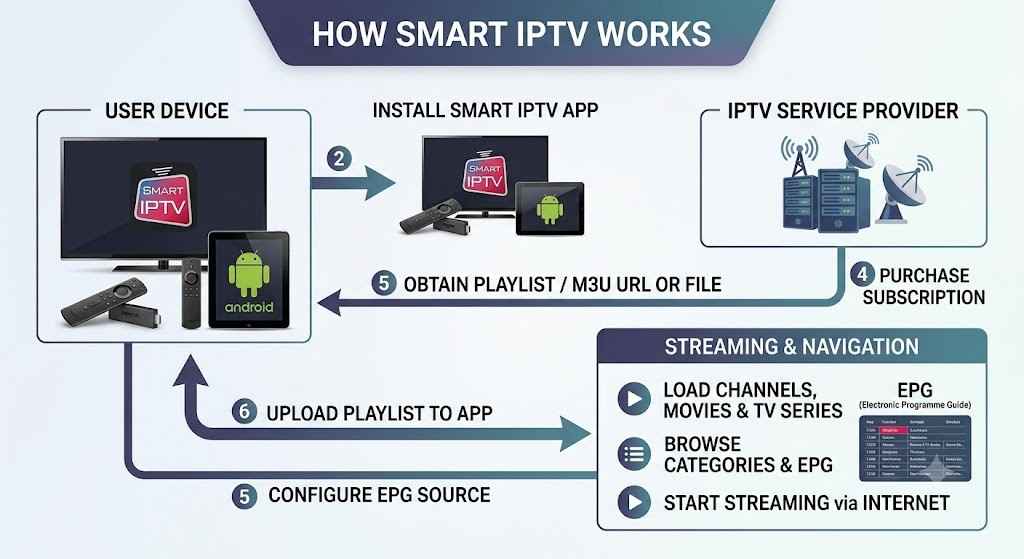
Smart IPTV itself does not provide television channels. Instead, it acts as an IPTV player that organises and displays playlists supplied by an IPTV service provider.
The general process is straightforward:
- Install the Smart IPTV application on a compatible device.
- Purchase an IPTV subscription from a trusted IPTV provider.
- Upload or enter the playlist URL or M3U file.
- Load the playlist into the application.
- Browse channels, movies and TV series.
- Start streaming using your internet connection.
After setup, users can easily navigate content using categories, Electronic Programme Guide (EPG) support and search features available with many IPTV services.
Key Features of Smart IPTV
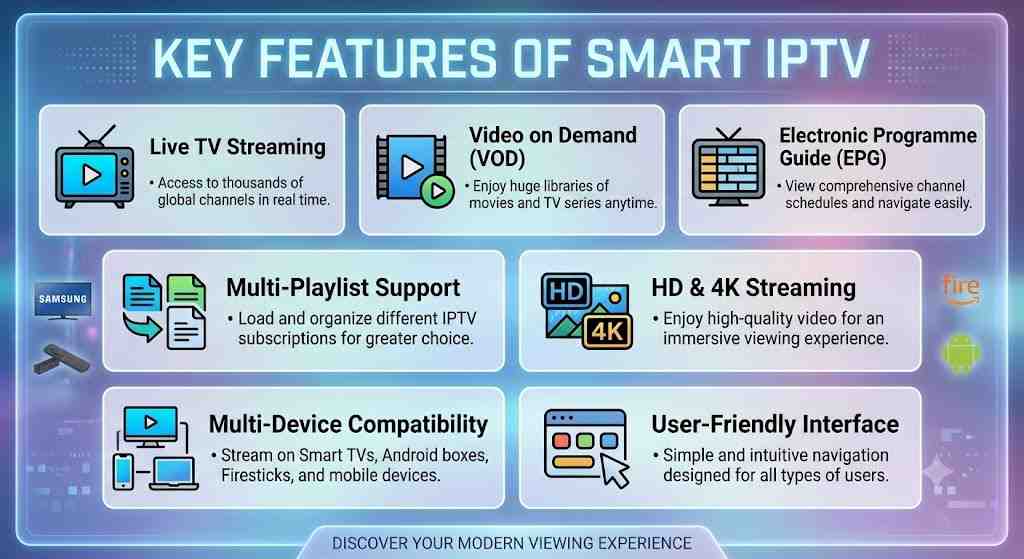
Smart IPTV includes several features that make internet TV streaming simple and convenient for different types of viewers.
| Feature | Description | Benefit |
|---|---|---|
| Live TV Streaming | Access live television channels | Watch events in real time |
| Video on Demand (VOD) | Movies and TV series library | Stream content anytime |
| Electronic Programme Guide (EPG) | View TV schedules | Easier programme navigation |
| Multi-Playlist Support | Load different IPTV playlists | Greater flexibility |
| HD & 4K Streaming | Supports high-quality video | Better viewing experience |
| Multi-Device Compatibility | Works on several platforms | Watch across different devices |
| User-Friendly Interface | Easy navigation | Suitable for beginners |
| Playlist Management | Organise favourite channels | Faster access |
Why Many Users Choose Smart IPTV
Several factors have contributed to the growing popularity of Smart IPTV among users worldwide.
- Flexible viewing from almost anywhere.
- Supports live TV and Video on Demand.
- Compatible with many Smart TVs and streaming devices.
- Simple playlist management.
- Often supports Full HD and 4K streaming.
- Easy navigation through Electronic Programme Guides.
- Ideal for households with multiple streaming devices.
These advantages make Smart IPTV an attractive option for users seeking a modern alternative to conventional television services.
Supported Devices
One of Smart IPTV’s strongest advantages is its broad compatibility with different devices. This allows users to enjoy IPTV streaming without purchasing expensive new hardware in many cases.
| Device | Supported | Recommended IPTV App Experience |
|---|---|---|
| Samsung Smart TV | ✅ Yes | Excellent |
| LG Smart TV | ✅ Yes | Excellent |
| Android TV | ✅ Yes | Excellent |
| Google TV | ✅ Yes | Excellent |
| Amazon Fire TV Stick | ✅ Yes | Very Good |
| Android Smartphone | ✅ Yes | Very Good |
| Android Tablet | ✅ Yes | Very Good |
| TV Box | ✅ Yes | Excellent |
| Windows PC | Limited | Depends on player |
| Mac | Limited | Depends on player |
| iPhone & iPad | Limited | Alternative IPTV apps may be required |
Devices That Deliver the Best Experience
Performance often depends on both the device and your internet connection. Larger screens and dedicated streaming devices generally provide smoother playback and easier navigation.
For many households, these options offer the best overall experience:
- Android TV
- Google TV
- Samsung Smart TVs
- LG Smart TVs
- Amazon Fire TV Stick
- Android TV Boxes
Using modern hardware also helps improve app responsiveness and supports higher-quality HD or 4K streaming where available.
Important Features to Look For
Not every IPTV service delivers the same experience. Before selecting an IPTV subscription, it is worth checking whether the provider offers the features you actually need.
| Feature | Why It Matters |
|---|---|
| Stable Streaming | Reduces buffering |
| HD & 4K Support | Better picture quality |
| EPG Support | Easier channel browsing |
| Catch-Up TV | Watch missed programmes |
| VOD Library | Access films and TV series |
| Multi-Device Support | Stream on different devices |
| Customer Support | Faster issue resolution |
| Regular Updates | Improved reliability |
| Trial Availability | Test before subscribing |
Choosing a provider based on these practical features can help you enjoy a more reliable and satisfying streaming experience over time.
Benefits of Smart IPTV
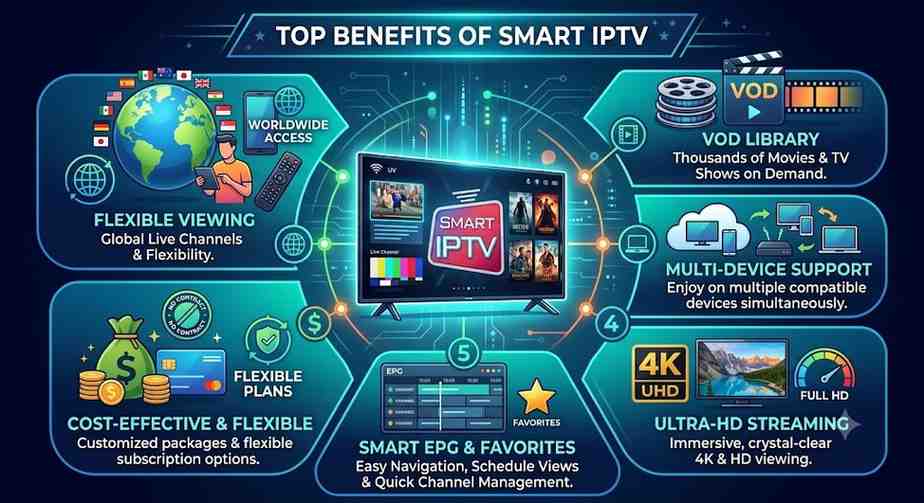
Smart IPTV has become a popular choice because it offers flexibility, convenience and access to a wide variety of entertainment. Instead of being tied to fixed broadcasting schedules, viewers can enjoy live TV and on-demand content whenever it suits them.
For families, travellers and sports enthusiasts, Smart IPTV provides a modern viewing experience that works across several compatible devices with a reliable internet connection.
Top Benefits of Using Smart IPTV
- Access thousands of live TV channels from different countries.
- Watch films and TV series through Video on Demand (VOD).
- Enjoy Full HD and 4K streaming where available.
- Stream on multiple compatible devices.
- Easy playlist management and channel organisation.
- Electronic Programme Guide (EPG) for simple navigation.
- Flexible subscription options from many IPTV providers.
- Suitable for home and mobile viewing.
These features make Smart IPTV an attractive option for users who want greater flexibility than traditional television services.
Smart IPTV vs Traditional Television
Although cable and satellite TV remain popular, IPTV streaming offers several advantages that suit today’s internet-connected households.
Smart IPTV vs Cable TV vs Satellite TV
| Feature | Smart IPTV | Cable TV | Satellite TV |
|---|---|---|---|
| Delivery Method | Internet Streaming | Cable Network | Satellite Signal |
| Installation | Usually Simple | Professional Installation | Dish Installation |
| Device Support | Multiple Devices | Limited Devices | Mainly TV Receivers |
| Channel Flexibility | High | Moderate | Moderate |
| Video on Demand | Usually Included | Limited | Limited |
| Live TV | Yes | Yes | Yes |
| HD & 4K Support | Available | Available | Available |
| Catch-Up TV | Often Available | Rare | Rare |
| Monthly Contracts | Usually Flexible | Often Required | Often Required |
| Internet Required | Yes | No | No |
Smart IPTV stands out because it combines live television with on-demand entertainment while supporting modern streaming devices and flexible subscriptions.
Which Option Is Best?
The right choice depends on your viewing habits and internet connection.
If you value flexibility and access across multiple devices, Smart IPTV is often the better option. However, users in areas with unstable internet may still prefer cable or satellite television for consistent viewing.
Smart IPTV vs Popular IPTV Players
Many people confuse Smart IPTV with IPTV players such as IPTV Smarters or TiviMate. While they all allow IPTV streaming, their interfaces and supported features can differ.
IPTV Player Comparison
| Feature | Smart IPTV | IPTV Smarters | TiviMate |
|---|---|---|---|
| Playlist Support | ✅ Yes | ✅ Yes | ✅ Yes |
| M3U Playlist | ✅ Yes | ✅ Yes | ✅ Yes |
| Xtream Codes Login | Limited | ✅ Yes | ✅ Yes |
| EPG Support | ✅ Yes | ✅ Yes | ✅ Yes |
| Catch-Up TV | Depends on Provider | Depends on Provider | Depends on Provider |
| Multi-Screen | Limited | ✅ Available | Premium Version |
| User Interface | Simple | Modern | Advanced |
| Best For | Smart TVs | Most Devices | Android TV Users |
Each IPTV player has strengths, so choosing one depends on your device and preferred interface rather than expecting one solution to suit everyone.
Internet Speed Requirements
A fast and stable internet connection is essential for smooth IPTV streaming. While exact requirements vary depending on video quality and network conditions, the following guide provides a useful benchmark.
Recommended Internet Speeds
| Streaming Quality | Minimum Speed | Recommended Speed |
|---|---|---|
| SD (480p) | 5 Mbps | 10 Mbps |
| HD (720p) | 10 Mbps | 20 Mbps |
| Full HD (1080p) | 20 Mbps | 30 Mbps |
| 4K UHD | 35 Mbps | 50 Mbps or Higher |
Using a wired Ethernet connection instead of Wi-Fi can also improve stability, especially when streaming Full HD or 4K content.
Tips for Better Streaming Performance
- Use high-speed broadband whenever possible.
- Restart your router regularly.
- Prefer Ethernet over Wi-Fi for Smart TVs.
- Close unused devices consuming bandwidth.
- Update your IPTV player regularly.
- Choose a reliable IPTV provider with stable servers.
Following these simple practices can significantly reduce buffering and improve your overall viewing experience.
Pros and Cons of Smart IPTV
Like any streaming technology, Smart IPTV has both advantages and limitations. Understanding both sides helps you make an informed decision.
Pros & Cons Comparison
| Pros | Cons |
|---|---|
| Flexible viewing on multiple devices | Requires a stable internet connection |
| Supports live TV and VOD | Service quality depends on the IPTV provider |
| Often includes HD and 4K streaming | Some features vary between apps |
| User-friendly interface | Initial setup may confuse beginners |
| Playlist management | Certain apps may require activation fees |
| Electronic Programme Guide support | Older devices may not perform well |
| Wide device compatibility | Playback quality depends on network speed |
Considering both the strengths and limitations allows you to set realistic expectations before subscribing to an IPTV service.
Who Should Use Smart IPTV?
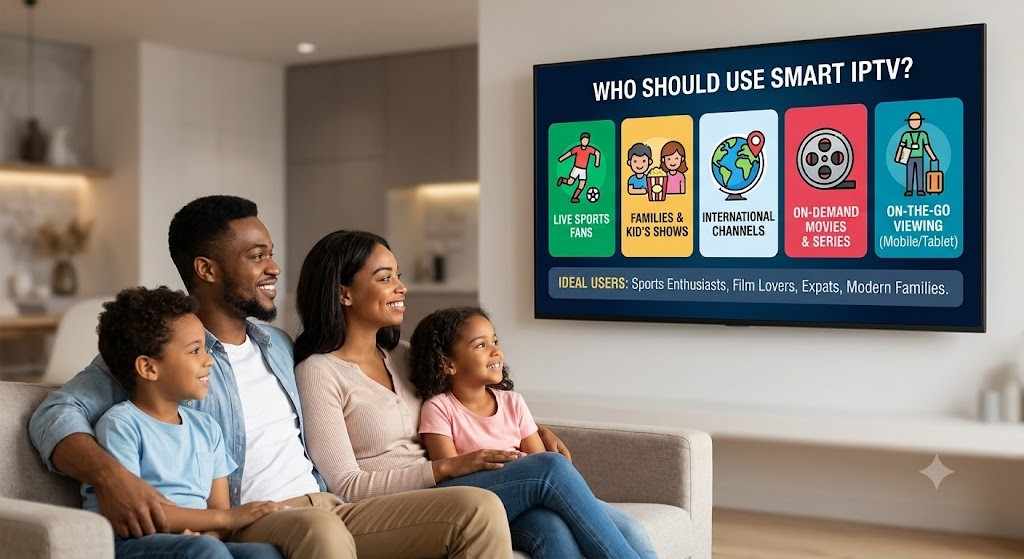
Smart IPTV suits a wide range of users thanks to its flexibility and extensive compatibility. Whether you stream occasionally or watch television every day, it can adapt to different viewing preferences.
Ideal Users
- Families wanting entertainment on multiple devices.
- Sports fans following live events.
- Film lovers who enjoy Video on Demand libraries.
- Travellers needing internet-based television.
- Expats looking for international channels.
- Smart TV owners seeking a modern streaming solution.
If your household already has a reliable broadband connection, Smart IPTV can provide a convenient alternative to traditional television services.
How to Choose the Best Smart IPTV Service
Selecting the right Smart IPTV service is about more than finding the lowest price. A reliable provider should offer stable streaming, responsive customer support and a content package that matches your viewing preferences.
Taking time to compare providers can save you from buffering, missing channels and poor customer service later.
Key Factors to Consider Before Buying
- Look for a provider with consistent server uptime.
- Check whether HD and 4K streaming are available.
- Ensure your preferred devices are fully supported.
- Choose services with Electronic Programme Guide (EPG) support.
- Compare subscription lengths and renewal options.
- Read independent customer reviews before subscribing.
- Test the service with a free or low-cost trial if available.
- Confirm customer support is available when needed.
Making an informed choice helps you enjoy a smoother IPTV streaming experience with fewer interruptions.
Smart IPTV Subscription Packages
Most IPTV providers offer several subscription options to suit different budgets and viewing habits.
IPTV Subscription Comparison
| Package | Duration | Live Channels | VOD Library | Multi-Screen | Best For |
|---|---|---|---|---|---|
| Monthly | 1 Month | ✔ Available | ✔ Included on many plans | Optional | New users |
| Quarterly | 3 Months | ✔ Available | ✔ Included | Optional | Occasional viewers |
| Semi-Annual | 6 Months | ✔ Available | ✔ Included | Often Available | Regular users |
| Annual | 12 Months | ✔ Available | ✔ Included | Common | Best long-term value |
Longer plans often reduce the monthly cost, but it is sensible to test a provider first before committing to an annual subscription.
Understanding IPTV Pricing
Prices vary depending on channel selection, streaming quality, server performance and included features.
| Pricing Factor | Impact on Cost |
|---|---|
| Number of Channels | Higher channel counts may increase pricing |
| Video Quality | 4K support may cost more |
| VOD Library Size | Larger libraries often increase value |
| Multi-Screen Access | Usually available on higher-tier plans |
| Premium Sports | May be included in premium packages |
| International Channels | Depends on provider |
| Customer Support | Better support often reflects service quality |
Rather than focusing solely on price, compare the overall value offered by each package.
Payment Options
Most reputable IPTV providers support several secure payment methods, making subscriptions easy to purchase.
Common Payment Methods
| Payment Method | Usually Available | Processing Time |
|---|---|---|
| Credit Card | ✔ Yes | Instant |
| Debit Card | ✔ Yes | Instant |
| PayPal | Often Available | Instant |
| Cryptocurrency | Available with some providers | Minutes |
| Bank Transfer | Sometimes Available | 1–3 Business Days |
Always purchase through secure payment pages and keep a record of your transaction for future reference.
Tips for Safe Purchasing
- Buy only from providers with transparent pricing.
- Read refund and cancellation policies.
- Avoid offers that seem unrealistically cheap.
- Check customer reviews from trusted sources.
- Use secure payment methods whenever possible.
- Keep your account details private.
A careful buying process reduces the risk of choosing an unreliable IPTV provider.
Smart IPTV App Comparison
Different IPTV players provide different features and interfaces. The best choice depends on your device and how you prefer to watch television.
IPTV Apps Comparison
| IPTV App | Android | Firestick | Smart TV | iPhone/iPad | EPG Support | Best For |
|---|---|---|---|---|---|---|
| Smart IPTV | ✔ | ✔ | ✔ | Limited | ✔ | Smart TVs |
| IPTV Smarters | ✔ | ✔ | ✔ | ✔ | ✔ | Most users |
| TiviMate | ✔ | ✔ | Limited | ✖ | ✔ | Android TV |
| XCIPTV | ✔ | ✔ | Limited | ✔ | ✔ | Beginners |
| OTT Navigator | ✔ | ✔ | Limited | ✖ | ✔ | Advanced users |
No single app is perfect for everyone. Consider compatibility, ease of use and available features before deciding.
Common Mistakes to Avoid
Many streaming issues result from avoidable mistakes rather than the IPTV application itself.
Avoid These Common Errors
- Choosing a provider based only on price.
- Ignoring internet speed requirements.
- Using outdated IPTV applications.
- Purchasing long subscriptions without testing.
- Forgetting to update playlists.
- Using unsupported streaming devices.
- Overloading your home network.
- Skipping customer reviews before buying.
Avoiding these mistakes can improve both reliability and long-term satisfaction.
Troubleshooting Smart IPTV Issues
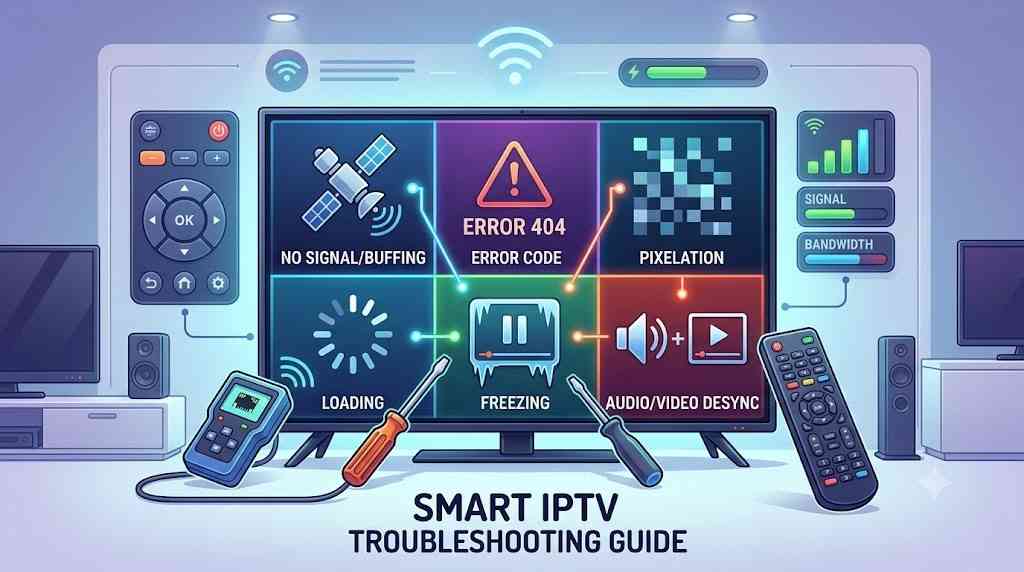
Even high-quality IPTV services may occasionally experience issues. Most common problems have straightforward solutions.
Troubleshooting Guide
| Problem | Possible Cause | Recommended Solution |
|---|---|---|
| Buffering | Slow internet | Improve connection speed or reduce network usage |
| Playlist Not Loading | Invalid M3U URL | Verify playlist details with your provider |
| No EPG Data | EPG not configured | Refresh or update the EPG source |
| Login Problems | Incorrect credentials | Re-enter login details carefully |
| App Freezing | Outdated app version | Install the latest update |
| Channels Missing | Playlist expired | Request an updated playlist |
| Poor Picture Quality | Low bandwidth | Upgrade your internet plan if necessary |
| Playback Stops | Temporary server issue | Restart the app and try again later |
If problems continue, contact your IPTV provider’s support team with details about your device, app version and internet connection to speed up troubleshooting.
Best Practices for Getting the Most from Smart IPTV
Using Smart IPTV effectively is about more than installing an app. Good streaming habits, reliable equipment and choosing a trustworthy IPTV provider all contribute to a better viewing experience.
Following a few best practices can reduce buffering, improve picture quality and help you get better value from your IPTV subscription.
Best Practices
- Keep your IPTV app updated to the latest version.
- Use a high-speed and stable internet connection.
- Connect via Ethernet where possible for better stability.
- Restart your router regularly to refresh the connection.
- Organise favourite channels for quicker access.
- Test new playlists before relying on them daily.
- Choose providers that update channels and EPG information regularly.
- Monitor your internet usage if multiple devices stream simultaneously.
Consistent maintenance helps ensure smoother streaming and fewer interruptions.
Safety and Legal Considerations
Before subscribing to any IPTV service, it’s important to understand that not every provider operates in the same way. While IPTV technology itself is legitimate, the legality of the content depends on whether the provider has the appropriate distribution rights.
As a consumer, you should always choose services that are transparent about their offerings and comply with the laws applicable in your country or region.
Smart IPTV Safety Checklist
| Best Practice | Why It Matters |
|---|---|
| Research the provider | Helps identify reputable services |
| Read customer reviews | Understand real user experiences |
| Check refund policies | Protect your purchase |
| Use secure payment methods | Reduce payment risks |
| Keep apps updated | Improves security and performance |
| Protect your login details | Prevent unauthorised access |
| Review subscription terms | Avoid unexpected renewals |
| Follow local laws | Ensure compliant use of IPTV services |
Being informed helps you make safer purchasing decisions and avoid unreliable providers.
Smart IPTV Buyer Checklist
Choosing an IPTV provider can feel overwhelming because many services advertise similar features. A simple checklist makes comparisons easier.
Before You Subscribe
| Checklist Item | Importance |
|---|---|
| Offers a free or low-cost trial | ★★★★★ |
| Stable HD & 4K streaming | ★★★★★ |
| Supports your devices | ★★★★★ |
| Includes Electronic Programme Guide (EPG) | ★★★★☆ |
| Offers Video on Demand (VOD) | ★★★★☆ |
| Responsive customer support | ★★★★★ |
| Flexible subscription options | ★★★★☆ |
| Secure payment methods | ★★★★★ |
| Positive customer feedback | ★★★★★ |
| Regular playlist updates | ★★★★☆ |
Using this checklist can help you compare providers objectively rather than choosing solely on price.
Final Thoughts
Smart IPTV has transformed the way people access television by combining live TV, Video on Demand and multi-device compatibility into one flexible streaming experience. With a stable internet connection and a reliable IPTV provider, users can enjoy entertainment across Smart TVs, Android devices, Firestick and other supported platforms.
However, not every IPTV service offers the same level of quality. Taking time to compare features, subscription options, customer support and streaming performance is essential before making a purchase. Looking beyond price alone often leads to a better long-term experience.
Whether you’re interested in live sports, international channels or on-demand films, Smart IPTV provides a convenient alternative to traditional television when paired with a reputable service.
Choose carefully, test services whenever possible and focus on providers that prioritise reliability, transparency and customer satisfaction. By making an informed decision, you’ll be better positioned to enjoy smooth, high-quality streaming that meets your entertainment needs.
Frequently Asked Questions
What is Smart IPTV?
Smart IPTV is an IPTV player that allows users to stream live TV channels and Video on Demand content using playlists provided by an IPTV service. The application itself does not supply channels; it simply organises and plays content from a compatible IPTV subscription. It supports many Smart TVs and streaming devices, making it a popular choice for internet-based television.
Do I need an IPTV subscription to use Smart IPTV?
Yes. Smart IPTV is only a media player and does not include television channels or movies. To watch content, you’ll need a subscription from an IPTV provider that supplies a compatible playlist, such as an M3U or other supported format.
What internet speed is recommended for Smart IPTV?
For reliable streaming, around 10 Mbps is suitable for HD content, while Full HD generally benefits from at least 20–30 Mbps. If you plan to watch 4K content, a stable connection of 50 Mbps or higher is recommended for the best experience with minimal buffering.
Which devices support Smart IPTV?
Smart IPTV is compatible with many Samsung and LG Smart TVs, Android TV, Google TV, Amazon Fire TV Stick, Android TV boxes and several other streaming devices. Support may vary depending on the operating system and application version, so it’s worth checking compatibility before installation.
How do I choose the best IPTV provider?
Look for providers that offer stable streaming, responsive customer support, compatible playlists, Electronic Programme Guide (EPG) functionality, flexible subscription plans and transparent pricing. Reading independent customer reviews and testing a free trial, where available, can help you make a more informed decision.