

A free popular IPTV playlist is one of the easiest ways to watch live television channels over the internet without relying on traditional cable or satellite services. IPTV (Internet Protocol Television) delivers TV content through an internet connection, allowing users to enjoy live TV, news, sports, entertainment, music, and educational channels on various devices.
Table of Contents
Many people search for free IPTV playlists because they want a simple and affordable way to stream television. However, it’s important to understand that not every IPTV playlist is the same. Some playlists contain free and legally available channels, while others may include copyrighted content without proper authorization. Choosing legal IPTV playlists helps ensure a safer, more reliable streaming experience.
In this guide, you’ll learn everything about free popular IPTV playlists, including how they work, the different playlist formats, supported devices, setup methods, and the best legal sources available in 2026. Whether you’re a beginner or an experienced IPTV user, this guide will help you enjoy IPTV safely and efficiently.
What Is a Free Popular IPTV Playlist?
A free popular IPTV playlist is a collection of streaming links that can be loaded into an IPTV player to watch internet-based television channels. These playlists are commonly provided in M3U or M3U8 format, making them compatible with most IPTV applications.
Instead of downloading individual channels one by one, a playlist organizes multiple streams into a single file or URL. Once imported into a compatible IPTV player, users can browse available channels just like they would on a traditional television service.
Unlike an IPTV subscription, a free IPTV playlist typically contains publicly available or licensed streams. Many organizations, broadcasters, and public institutions offer free internet television channels that anyone can access without paying a monthly subscription.
Common content available through legal IPTV playlists includes:
- News channels
- Educational programs
- Public television
- Government broadcasts
- Religious channels
- Music channels
- Travel programming
- Lifestyle content
- Kids’ educational channels
- International free-to-air television
Because these playlists are internet-based, they can be accessed from almost anywhere with a stable internet connection.
How Does an IPTV Playlist Work?
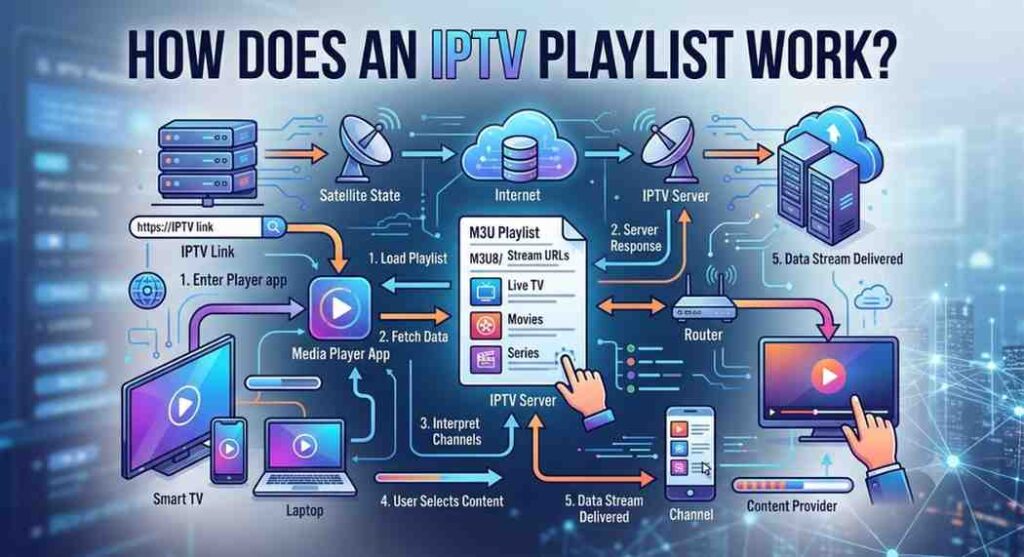
An IPTV playlist works by storing streaming URLs inside a text-based playlist file. When you open the playlist using an IPTV player, the application reads each streaming link and displays the available channels in an organized list.
Instead of broadcasting television through satellite signals or cable infrastructure, IPTV uses internet protocols to deliver content directly to your device.
The process is simple:
- Obtain a legal M3U playlist or streaming URL.
- Install a compatible IPTV player.
- Import the playlist into the player.
- Allow the channels to load.
- Browse and start watching available content.
Most IPTV players automatically organize channels into categories such as News, Movies, Sports, Music, Kids, and Entertainment, making navigation quick and user-friendly.
Read Also : Best IPTV Service
M3U vs M3U8: What’s the Difference?
When searching for IPTV playlists, you’ll often encounter M3U and M3U8 formats. Although they are closely related, there are a few differences.
M3U Playlist
An M3U file is the standard playlist format used by most IPTV players. It contains links to audio or video streams and is supported by nearly every IPTV application.
Advantages:
- Easy to use
- Lightweight file size
- Compatible with most IPTV players
- Simple to update
M3U8 Playlist
M3U8 is an extension of the M3U format that uses UTF-8 character encoding. It offers better support for international languages and modern streaming technologies.
Advantages:
- Better multilingual support
- Improved compatibility
- Ideal for live streaming
- Widely supported across modern devices
For most users, both formats work similarly, and modern IPTV players can open either without any additional configuration.
Why Are IPTV Playlists So Popular?
The popularity of IPTV playlists continues to grow because they offer flexibility, convenience, and compatibility across many devices. Instead of being tied to a cable box, users can access internet television from virtually anywhere.
Some of the biggest reasons people prefer IPTV playlists include:
- Easy setup process
- Support for multiple devices
- Flexible viewing options
- Access to public and free-to-air channels
- User-friendly IPTV players
- No cable installation required
- Regular playlist updates
- Organized channel categories
With the right IPTV player and a stable internet connection, users can enjoy a smooth streaming experience from home or while traveling.
Benefits of Using Legal IPTV Playlists
Choosing legal IPTV playlists provides several important advantages over unverified sources.
Some key benefits include:
- Safe and secure streaming
- Reliable channel availability
- Better streaming quality
- No unauthorized content
- Compatible with popular IPTV players
- Regular updates from official broadcasters
- Reduced risk of malware or malicious links
Using trusted and legal IPTV playlists also helps ensure a more stable viewing experience while respecting content licensing and copyright laws.
Benefits of Free IPTV Playlists
Free IPTV playlists have become increasingly popular because they provide an easy way to access internet-based television without the need for traditional cable or satellite services. When you use legal IPTV playlists, you can enjoy a wide variety of free-to-air and publicly available channels on multiple devices.
Here are some of the biggest advantages of using a free IPTV playlist.
Cost-Effective Entertainment
One of the main reasons people use free IPTV playlists is that they don’t require a monthly subscription. Many broadcasters and public organizations provide free internet streams, allowing users to watch news, educational programs, and entertainment without additional costs.
Watch on Multiple Devices
Modern IPTV playlists work across a wide range of devices, including:
- Smart TVs
- Android TV
- Google TV
- Amazon Firestick
- Windows PCs
- Mac computers
- Android smartphones
- iPhones and iPads
- Tablets
- Streaming boxes
This flexibility allows you to enjoy your favorite content wherever you are.
Easy to Set Up
Most IPTV players make installation simple. All you need to do is install an IPTV player, import an M3U playlist or playlist URL, and allow the application to load the available channels.
No complicated hardware or professional installation is required.
Wide Variety of Content
Depending on the playlist source, users may find:
- News channels
- Educational programs
- Music channels
- Kids’ content
- Religious channels
- Lifestyle programming
- Travel channels
- Government broadcasts
- International television
- Public service channels
Regular Playlist Updates
Many official IPTV playlist providers update their playlists regularly to remove inactive streams and add new channels. Updated playlists generally offer better reliability and improved playback.
Legal vs. Illegal IPTV Playlists
Understanding the difference between legal and illegal IPTV playlists is extremely important before using any IPTV service.
Legal IPTV Playlists
Legal IPTV playlists contain streaming links that are publicly available or licensed for free distribution. These playlists are offered by broadcasters, government organizations, educational institutions, or streaming platforms that have permission to distribute their content online.
Examples include:
- Public television broadcasts
- Government information channels
- Educational networks
- Community television
- Free-to-air internet streams
Using legal IPTV playlists helps ensure a safer streaming experience while respecting copyright laws.
Illegal IPTV Playlists
Some IPTV playlists include copyrighted television channels, movies, or sports broadcasts without permission from the rights holders. Accessing or distributing unauthorized copyrighted content may violate local laws and the terms of service of content owners.
Before using any IPTV playlist, verify that the content is offered legally by the broadcaster or service.
Features to Look for in an IPTV Playlist
Not every IPTV playlist provides the same quality or user experience. Choosing a well-maintained playlist can significantly improve streaming performance.
Here are some features to consider:
Stable Streaming Links
Reliable playlists contain working streaming URLs that load quickly and remain active for longer periods.
Organized Channel Categories
The best playlists organize channels into categories such as:
- News
- Entertainment
- Movies
- Kids
- Music
- Lifestyle
- Sports (where legally available)
- International
This makes navigation much easier.
HD Streaming Support
Many legal IPTV playlists now support:
- SD
- HD (720p)
- Full HD (1080p)
- 4K streams (where available)
Higher-quality streams provide a much better viewing experience.
Electronic Program Guide (EPG)
Some IPTV playlists include Electronic Program Guide support, allowing users to view current and upcoming television schedules directly within their IPTV player.
Regular Maintenance
A frequently updated playlist is less likely to contain broken or inactive streaming links.
Devices That Support IPTV Playlists
One of IPTV’s biggest advantages is its excellent compatibility across modern devices.
Popular supported devices include:
Smart TVs
Many Samsung, LG, Sony, TCL, and Android Smart TVs support IPTV applications.
Amazon Firestick
Firestick remains one of the most popular devices for IPTV because it is affordable, portable, and easy to install.
Android TV & Google TV
Android-based televisions offer access to numerous IPTV player applications through official app stores.
Windows & Mac
Desktop and laptop users can enjoy IPTV playlists using compatible media players or IPTV software.
Smartphones & Tablets
Both Android and iOS devices support IPTV playback through various compatible applications, making it easy to stream content while traveling.
Internet Speed Recommendations
Streaming quality depends heavily on your internet connection.
For the best experience, consider these minimum speed recommendations:
- SD Streaming: 5 Mbps
- HD Streaming: 10 Mbps
- Full HD Streaming: 15 Mbps
- 4K Streaming: 25 Mbps or higher
If multiple users stream content simultaneously, higher internet speeds are recommended.
Using a wired Ethernet connection instead of Wi-Fi can also improve stability and reduce buffering.
Best IPTV Players for M3U Playlists

To enjoy IPTV playlists, you’ll need a compatible IPTV player. These applications organize channels, load playlists, and provide a user-friendly viewing experience.
Popular IPTV players include:
IPTV Smarters Pro
Known for its simple interface and support for M3U playlists, Xtream Codes, and Electronic Program Guide integration.
TiviMate
A favorite among Android TV and Firestick users thanks to its modern interface, advanced customization, and premium features.
VLC Media Player
A free and lightweight media player capable of opening M3U playlists on Windows, macOS, and Linux.
Kodi
Kodi supports IPTV through add-ons, offering a highly customizable media center experience.
Televizo IPTV Player
A lightweight Android IPTV player with playlist management, subtitle support, and Chromecast compatibility.
XCIPTV Player
An easy-to-use IPTV player that supports live TV, VOD, EPG, and multiple playlist formats.
Best Legal Sources for Free Popular IPTV Playlists
Finding a reliable free popular IPTV playlist can be challenging because many playlists found online quickly become inactive or contain broken streaming links. The safest option is to use playlists that include publicly available, free-to-air, or officially licensed channels. These sources are more reliable, regularly maintained, and compatible with most IPTV players.
Below are some of the best legal sources for free IPTV playlists in 2026.
1. Pluto TV
Pluto TV is one of the most popular free streaming platforms available today. It offers hundreds of live television channels along with thousands of on-demand movies and TV shows.
Popular categories include:
- News
- Movies
- Entertainment
- Reality TV
- Kids
- Comedy
- Lifestyle
- Music
- Crime
- Sports highlights
Since Pluto TV is officially licensed, users can stream its free content safely on Smart TVs, mobile devices, and streaming players.
2. Plex Live TV
Plex is well known for media management, but it also offers hundreds of free live television channels.
Users can watch:
- News
- Documentaries
- Cooking
- Lifestyle
- Movies
- Classic television
- Travel
- Entertainment
- Music
Plex works on almost every major device, including Smart TVs, Firestick, Android, iPhone, Windows, and Mac.
3. Samsung TV Plus
Samsung TV Plus is available on compatible Samsung Smart TVs and Galaxy devices. It provides free live television without requiring a subscription.
Available categories include:
- News
- Entertainment
- Kids
- Sports highlights
- Movies
- Music
- Lifestyle
- Reality TV
The service is built directly into supported Samsung devices, making setup extremely simple.
4. PBS Live Streams
Public Broadcasting Service (PBS) offers educational programming, documentaries, local news, children’s content, and cultural programs through its official streaming platforms.
Popular PBS content includes:
- Educational documentaries
- Nature programs
- History
- Science
- Kids programming
- Public affairs
PBS remains one of the most trusted free television sources in the United States.
5. NASA+
For users interested in science and space exploration, NASA+ provides free access to educational videos, live events, documentaries, and space mission coverage.
Viewers can enjoy:
- Rocket launches
- Space station updates
- Astronomy programs
- Science documentaries
- Educational content
- Live NASA events
NASA’s streams are publicly available and completely free.
6. Local Free-to-Air Channels
Many local television broadcasters provide free internet streams of their news broadcasts and public programming.
Depending on your region, you may find:
- Local news
- Weather reports
- Community events
- Government announcements
- Educational programming
These streams are often available through official broadcaster websites or apps.
How to Choose a Reliable IPTV Playlist
Not every IPTV playlist provides a good streaming experience. Before importing any playlist into your IPTV player, consider these factors.
Playlist Updates
A frequently updated playlist is more likely to contain working streams and current channel information.
Stable Streaming
Choose playlists with reliable streaming links that experience minimal buffering and downtime.
Organized Categories
Well-maintained playlists organize channels into categories such as:
- News
- Entertainment
- Movies
- Kids
- Music
- Lifestyle
- International
Organized playlists make it easier to find the content you want.
EPG Support
An Electronic Program Guide (EPG) displays current and upcoming TV schedules, creating a more user-friendly viewing experience.
Device Compatibility
Ensure the playlist works with your preferred IPTV player and streaming device.
Why Some IPTV Playlists Stop Working
Many users wonder why IPTV playlists occasionally fail to load or lose channels. Several common factors can cause this.
Expired Streaming Links
Some streams are temporary and eventually become unavailable.
Server Maintenance
Official broadcasters sometimes perform maintenance, temporarily affecting stream availability.
Playlist Not Updated
Older playlists may still reference inactive streaming links.
Internet Issues
A slow or unstable internet connection can prevent channels from loading properly.
Geographic Restrictions
Certain broadcasters limit their streams to specific countries or regions.
Tips for Maintaining IPTV Playlists
To keep your IPTV experience running smoothly:
- Refresh playlists regularly.
- Remove inactive or broken channels.
- Update your IPTV player.
- Use a stable internet connection.
- Keep your device software up to date.
- Import playlists only from trusted sources.
- Back up your favorite playlists if supported by your IPTV app.
These simple practices help improve reliability and reduce playback issues.
Can You Create Your Own IPTV Playlist?
Yes. Many IPTV players allow users to create custom playlists by combining publicly available streaming links into a single M3U file. This lets you organize your favorite legal channels into categories that suit your preferences.
A custom playlist can include:
- Local news channels
- Educational streams
- Public broadcasting stations
- Government channels
- Music channels
- Travel programming
- Lifestyle content
Creating your own playlist makes navigation easier and gives you greater control over your viewing experience.
How to Add a Free IPTV Playlist to Popular IPTV Players
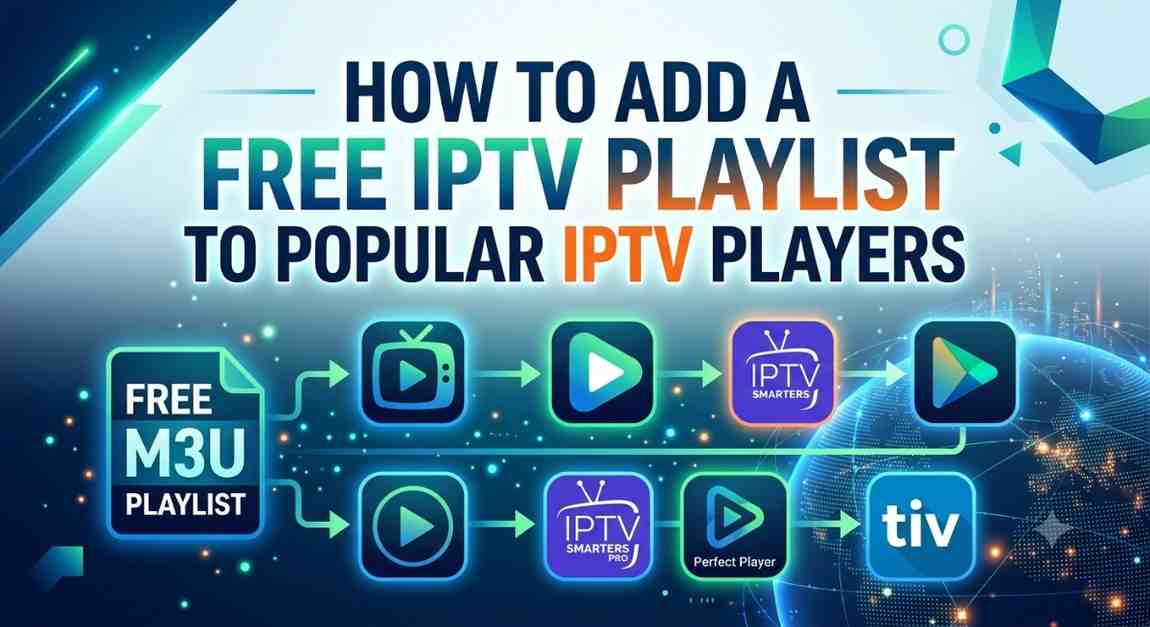
After finding a legal free IPTV playlist, the next step is adding it to an IPTV player. Most IPTV applications support M3U Playlist URLs or M3U playlist files, making the setup process quick and beginner-friendly.
Below are step-by-step instructions for installing IPTV playlists on some of the most popular IPTV players.
IPTV Smarters Pro
IPTV Smarters Pro is one of the most widely used IPTV players because it supports Android, iPhone, Firestick, Windows, macOS, and Smart TVs.
Setup Steps
- Install IPTV Smarters Pro on your device.
- Launch the application.
- Select Load Your Playlist or File/URL.
- Enter the playlist name.
- Paste your legal M3U Playlist URL or upload the M3U file.
- Click Add User.
- Wait for the channels to load.
- Start streaming your available content.
The application automatically organizes channels and supports Electronic Program Guide (EPG) when available.
TiviMate
TiviMate is one of the best IPTV players for Android TV and Firestick users.
Installation Guide
- Open TiviMate.
- Select Add Playlist.
- Choose M3U Playlist.
- Enter your playlist URL.
- Click Next.
- Wait while the playlist loads.
- If available, add the EPG source.
- Finish the setup and begin watching.
TiviMate also supports multiple playlists, favorites, and advanced channel management.
VLC Media Player
VLC Media Player is a free and lightweight media player that supports IPTV playlists on Windows, macOS, and Linux.
Setup Process
- Install VLC Media Player.
- Open VLC.
- Click Media.
- Select Open Network Stream.
- Paste your M3U playlist URL.
- Click Play.
VLC immediately loads the available channels from the playlist.
Kodi
Kodi is a powerful media center that supports IPTV through compatible add-ons.
Setup Guide
- Install Kodi.
- Open the application.
- Go to Settings.
- Select Add-ons.
- Install the PVR IPTV Simple Client.
- Open the add-on settings.
- Enter your M3U Playlist URL.
- Restart Kodi.
After restarting, the channels appear inside Kodi’s TV section.
XCIPTV Player
XCIPTV offers a clean interface and excellent compatibility with M3U playlists.
How to Add a Playlist
- Open XCIPTV.
- Select the M3U playlist option.
- Enter the playlist URL.
- Save your settings.
- Wait for the channels to load.
XCIPTV also supports external video players and EPG integration.
Televizo IPTV Player
Televizo is a lightweight IPTV player designed primarily for Android devices.
Installation Steps
- Install Televizo.
- Open the application.
- Tap Create Playlist.
- Select M3U Playlist.
- Enter your playlist URL.
- Save the playlist.
- Allow the channels to load.
The interface is simple, making it an excellent choice for beginners.
Tips for Better IPTV Streaming
Even the best IPTV playlist depends on your internet connection and device performance. Follow these tips for smoother playback:
- Use a high-speed internet connection.
- Connect through Ethernet instead of Wi-Fi when possible.
- Close unused background applications.
- Restart your IPTV player occasionally.
- Update your IPTV app regularly.
- Refresh playlists if channels stop loading.
- Keep your device software updated.
These simple steps can significantly reduce buffering and improve video quality.
Common IPTV Playlist Issues and Solutions
Sometimes IPTV playlists may not work as expected. Here are a few common problems and how to fix them.
Playlist Won’t Load
Possible causes:
- Incorrect playlist URL
- Internet connection issues
- Expired playlist
Solution:
Verify the playlist URL, check your internet connection, and use an updated playlist.
Buffering During Playback
Possible causes:
- Slow internet speed
- Weak Wi-Fi signal
- Network congestion
Solution:
Use a faster internet connection or switch to a wired Ethernet connection for more stable streaming.
Missing Channels
Possible causes:
- Outdated playlist
- Removed channels
- Playlist update required
Solution:
Refresh or reload the playlist and ensure you’re using the latest version from a trusted source.
EPG Not Displaying
Possible causes:
- Missing EPG URL
- Incorrect settings
- Unsupported playlist
Solution:
Add the correct EPG source in your IPTV player and refresh the guide.
Safety Tips When Using IPTV Playlists
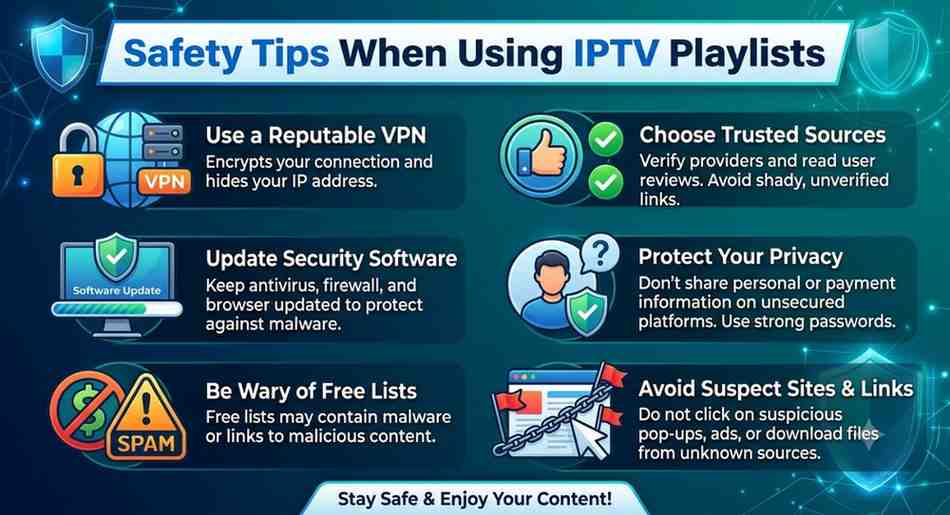
For the best experience, always use IPTV playlists from trusted and legitimate sources.
Follow these best practices:
- Use only legal and authorized playlists.
- Download IPTV players from official app stores.
- Keep your IPTV app updated.
- Avoid unknown websites offering suspicious playlist files.
- Regularly update your playlists.
- Protect your device with reliable security software.
Following these guidelines helps ensure a safer and more reliable streaming experience.
Advanced Tips for Getting the Best IPTV Experience
Using a free popular IPTV playlist is simple, but following a few best practices can significantly improve your streaming quality. Whether you’re watching live TV, educational channels, or other legally available content, optimizing your setup helps reduce buffering and ensures a smoother viewing experience.
Keep Your IPTV Player Updated
Developers regularly release updates that improve performance, fix bugs, and add new features. Keeping your IPTV player updated ensures better compatibility with the latest M3U playlists and streaming technologies.
Benefits of updating include:
- Faster channel loading
- Better playback stability
- Improved security
- New features
- Bug fixes
Organize Your Favorite Channels
Many IPTV players allow you to create a Favorites list. Instead of scrolling through hundreds of channels, you can quickly access the content you watch most often.
Popular categories include:
- News
- Entertainment
- Kids
- Music
- Lifestyle
- Documentaries
- Educational channels
A well-organized channel list makes navigation faster and more convenient.
Use a Reliable Internet Connection
Your internet connection has the biggest impact on IPTV performance.
For smooth playback, consider these recommended speeds:
- SD Streaming: 5 Mbps
- HD Streaming: 10 Mbps
- Full HD: 15 Mbps
- 4K UHD: 25 Mbps or higher
If multiple devices are streaming simultaneously, upgrading your internet plan may improve overall performance.
Restart Your Streaming Device Regularly
Over time, streaming devices can accumulate temporary files that slow down performance. Restarting your device occasionally can:
- Improve speed
- Clear temporary memory
- Reduce buffering
- Refresh network connections
This simple maintenance step often resolves minor playback issues.
Keep Your Playlist Updated
Some IPTV channels may occasionally change or become unavailable. Refreshing your playlist ensures you have the latest available streams and channel information.
Many IPTV players include a Refresh Playlist option that updates channel lists without requiring a complete reinstallation.
Advantages of Free IPTV Playlists
Legal free IPTV playlists offer several benefits for users looking for flexible entertainment options.
Free Access
Many playlists provide access to publicly available television channels without requiring a paid subscription.
Easy Setup
Most IPTV players support M3U playlists, making installation quick and beginner-friendly.
Multi-Device Compatibility
Users can stream content on Smart TVs, Android devices, Firestick, Windows PCs, Macs, tablets, and smartphones.
Flexible Viewing
Watch content from virtually anywhere with an internet connection.
Regular Content Updates
Official providers frequently update their playlists, helping maintain reliable streaming quality.
Limitations of Free IPTV Playlists
Although free IPTV playlists have many advantages, they also come with a few limitations.
Limited Premium Content
Free playlists generally focus on publicly available channels and may not include premium entertainment or subscription-only programming.
Regional Availability
Some streams are available only in certain countries due to licensing or broadcasting restrictions.
Occasional Broken Links
Even official streams may become temporarily unavailable because of server maintenance or schedule changes.
Internet Dependency
Unlike traditional broadcast television, IPTV requires a stable internet connection to stream content smoothly.
Conclusion
A free popular IPTV playlist is an excellent way to enjoy legally available television channels using a compatible IPTV player. With support for Smart TVs, Firestick, Android devices, Windows PCs, Macs, and smartphones, IPTV offers a flexible and convenient viewing experience across multiple platforms.
To get the best results, choose playlists from trusted and authorized sources, keep your IPTV player updated, and maintain a stable internet connection. Regularly refreshing your playlists and organizing your favorite channels can also improve usability and reduce playback issues.
As IPTV technology continues to evolve, legal IPTV playlists remain a practical option for accessing news, educational programming, public broadcasts, lifestyle channels, and other free-to-air content. By following the tips in this guide, you can enjoy a reliable, safe, and high-quality IPTV streaming experience in 2026 and beyond.
Frequently Asked Questions
What is a free IPTV playlist?
A free IPTV playlist is a collection of streaming links—typically in M3U or M3U8 format—that allows compatible IPTV players to access legally available internet television channels.
Are free IPTV playlists legal?
Yes, if they contain publicly available or properly licensed streams. Always use playlists from trusted and authorized sources.
Which devices support IPTV playlists?
Most IPTV playlists work on:
Android TV
Firestick
Google TV
Smart TVs
Windows PCs
Which IPTV player is best for M3U playlists?
Popular IPTV players include:
IPTV Smarters Pro
TiviMate
VLC Media Player
XCIPTV
Televizo
Kodi
Can I use a free IPTV playlist on multiple devices?
Yes. Most M3U playlists can be used on multiple compatible devices, including Smart TVs, Android phones, Firestick, Windows PCs, and tablets, provided the playlist source allows it.
What file format do IPTV playlists use?
The most common formats are M3U and M3U8 These formats are supported by most IPTV players and are easy to import using a playlist URL or local file.
How often should I update my IPTV playlist?
It’s a good idea to refresh your IPTV playlist regularly, especially if channels stop working or new content becomes available. Many IPTV players include an automatic refresh option for added convenience.